Windows下分卷压缩包解压

The video data is provided as one large TGZ archive, split into parts of 1 GB max. The total download size is 19.4 GB. The archive contains webm-files using the VP9 codec. Files are numbered from 1 to 220847.

20bn-something-something-v2-00
20bn-something-something-v2-01
20bn-something-something-v2-02
20bn-something-something-v2-03
20bn-something-something-v2-04
20bn-something-something-v2-05
20bn-something-something-v2-06
20bn-something-something-v2-07
20bn-something-something-v2-08
20bn-something-something-v2-09
20bn-something-something-v2-10
20bn-something-something-v2-11
20bn-something-something-v2-12
20bn-something-something-v2-13
20bn-something-something-v2-14
20bn-something-something-v2-15
20bn-something-something-v2-16
20bn-something-something-v2-17
20bn-something-something-v2-18
20bn-something-something-v2-19

Linux下很好解压:

1
cat 20bn-something-something-v2-?? | tar zx

Windows下需要将所有的分卷先合并:

1
copy /b 20bn* temp.tar.gz

然后用解压软件打开即可。

#相关链接

Late Temporal Modeling in 3D CNN Architectures with BERT for Action Recognition

#Late Temporal Modeling in 3D CNN Architectures with BERT for Action Recognition

HMDB51UCF101top-1达到现阶段最好的水平,分别为85.10%98.69%

时序全局平均池化阻碍了时序信息的更丰富表达。虽然感受野可能分布在整个视频切片中,但是对于不同的切片,它所能提供的信息是服从高斯分布的,简单的平均可能会损失信息。

temporal global average pooling (TGAP) layer is used at the end of all 3D CNN architectures hinders the richness of final temporal information.
the receptive field might cover the whole clip, the effective receptive field has a Gaussian distribution

#相关链接

从流中获取 properties

#IDEA 小技巧

  • alt按住移动鼠标可以多行编辑。
  • cmd + n可以快速创建构造器(自行选择参数)或者重写继承方法。

GFNET A LIGHTWEIGHT GROUP FRAME NETWORK FOR EFFICIENT HUMAN ACTION RECOGNITION

#GFNET: A LIGHTWEIGHT GROUP FRAME NETWORK FOR EFFICIENT HUMAN ACTION RECOGNITION

为了解决现有的行为识别方法计算量大参数多的问题,作者提出了GFNet

To handle these issues, we propose a lightweight neural network called Group Frame Network (GFNet).

GFNet 通过帧级分解,以极小的代价提取每一帧的特征。

GFNet adds frame-level decomposition to extract features of each frame at a minuscule cost.

设计了两个核心组件,能够仅从RGB图像中提取时空信息,而不需要借助光流multi-scale testing等。

There are two core components: Group Temporal Module (GTM) and Group Spatial Module (GSM). These two modules enable GFNet to obtain temporal-spatial information only from RGB images.

为了证明模型的有效性,他们没有使用预训练策略。

To verify the validity of the model, no pre-training strategy is used in our experiments.

网络的输入是一定数量视频帧,对视频进行分段采样得到结果。

The entire video with a variable number of frames is provided as the input of the network. Through an average sampling strategy, the video is divided into N equal-length segments and only one frame is selected from each segment. Due to the repeatability of adjacent frames, this sampling strategy can reduce inter-frame redundancy while preserving long-temporal information.

K 个层同时输入网络获取时间信息。

The first part is a feature extraction layer consisting of K separated branches. The sampled frames are simultaneously fed into the network to maintain the temporal information among these frames.

各自的分支独立计算获得空间信息。

In the feature extraction layer, each frame is learned independently using a network branch to get its spatial features.

没太理解。

all the sampled frames are stacked by channel-wise convolution.
It means that the input channel of GFNet is 3N when using RGB images as input.

由于残差网络具有高度的泛化能力和性能,所以后续的块选择高度模块化残差单元。

Owing to the impressive performance and strong generalization abil- ity of residual architecture, the block is based on the highly modularized residual unit.

这句话没太理解。

Considering the extraneous motion and identical texture features in sampled frames, GFNet decomposes frames and reduces the number of channels for each frame to lessen spatial redundancy. To be specific, the number of channels is equally divided among branches. It means that only a small number of channels are used per frame.

#Group Temporal Module

因为每个分支都是单独计算的,所以势必会降低准确率(没有提取帧间的联系),所以提出了GTM模块。

To leverage the inter-frame information effectively and better strengthen temporal relationships, GTM is proposed to efficiently overcome the side effects brought by the separated branch.

GTM consists of a translation layer and a 3D convolution layer.

The translation layer makes the replacement of the data dimension. It includes the channel merger and the channel separation, which achieves the conversion of the feature map from four-dimensional data to five-dimensional data.

#Group Spatial Module

For the convolution layer of ResNet50, the computational cost is closely related to the number of channels. Motivated by this, a novel module called GSM is designed to significantly decrease the number of parameters and computational efforts.

GSM 也是通过只取纹理来最小化计算成本。

Because of the similarity among frames, the texture information is repetitive. Meanwhile, irrelevant motion inside frames increases the intra-frame redundancy. Aiming at minimizing the interference of redundant information, GSM diminishes the number of channels to extract features per frame.

MacOS下配置maven

官方下载地址:http://maven.apache.org/download.cgi

下载:https://mirrors.tuna.tsinghua.edu.cn/apache/maven/maven-3/3.6.3/binaries/apache-maven-3.6.3-bin.tar.gz

解压之后,复制目录:/Users/onns/Downloads/java/apache-maven-3.6.3

因为系统更新后,命令行从bash换成了zsh所以环境变量文件也改了:.zshrc

1
2
3
echo 'export M2_HOME=/Users/onns/Downloads/java/apache-maven-3.6.3/bin' >> .zshrc
echo 'export MAVEN_HOME=/Users/onns/Downloads/java/apache-maven-3.6.3' >> .zshrc
echo 'export PATH=$MAVEN_HOME/bin:$PATH' >> .zshrc

让环境变量生效:

1
source .zshrc

测试:

1
2
3
4
5
6
$ mvn --version
Apache Maven 3.6.3 (cecedd343002696d0abb50b32b541b8a6ba2883f)
Maven home: /Users/onns/Downloads/java/apache-maven-3.6.3
Java version: 13.0.2, vendor: Oracle Corporation, runtime: /Library/Java/JavaVirtualMachines/jdk-13.0.2.jdk/Contents/Home
Default locale: en_CN, platform encoding: UTF-8
OS name: "mac os x", version: "10.15.5", arch: "x86_64", family: "mac"

#修改镜像源

参照阿里云的使用指南:https://maven.aliyun.com/mvn/guide

打开$MAVEN_HOME/conf/settings.xml

<mirrors></mirrors>标签中添加mirror子节点:

1
2
3
4
5
6
<mirror>
<id>aliyunmaven</id>
<mirrorOf>*</mirrorOf>
<name>阿里云公共仓库</name>
<url>https://maven.aliyun.com/repository/public</url>
</mirror>

#配置本地仓库

打开$MAVEN_HOME/conf/settings.xml

1
2
3
4
5
6
7
8
<!-- localRepository
| The path to the local repository maven will use to store artifacts.
|
| Default: ${user.home}/.m2/repository
<localRepository>/path/to/local/repo</localRepository>
-->

<localRepository>/Users/onns/Downloads/java/apache-maven-3.6.3/repo</localRepository>

#相关链接

PAN Towards Fast Action Recognition via Learning Persistence of Appearance

#PAN: Towards Fast Action Recognition via Learning Persistence of Appearance

比光流网络快了1000倍

Our PA is over 1000× faster (8196fps vs. 8fps) than conventional optical flow in terms of motion modeling speed

运动边界的微小位移在动作识别中起重要作用的角色。

According to the aforementioned anal- ysis, we can conclude that small displacements of motion boundaries play a vital role in action recognition.

低层的feature map之间的差异能更多地关注边界的变化。

the differences among low-level feature maps will pay more attention to the variations at boundaries.
In summary, differences in low-level feature maps can reflect small displacements of motion boundaries due to convolutional operations.

UCF101上做实验表明在第一层效果最好。

We define the basic conv-layer as eight 7×7 convolutions with stride=1 and padding=3, so that the spatial resolutions of the obtained feature maps are not reduced.

两种编码策略:

PA as motion modality

PA as attention

第一种无论是从计算量上还是从准确率上都要更好。

可能原因是第二种融合方法导致图像的不平衡。

However, for e2, attending appearance feature maps with PA will highlight the motion boundaries, leading to the imbalanced appearance responses both inside and at the boundaries of the moving objects.

Various-timescale Aggregation Pooling

#安装测试

1
2
3
4
5
pip install torch torchvision
pip install tensorboardX
pip install tqdm
pip install scikit-learn
pip install lmdb

#实验结果

#Lite

1
2
3
4
5
6
7
8
9
10
11
12
13
14
15
16
17
18
19
20
21
22
23
24
25
26
27
28
29
30
31
32
33
34
35
36
37
38
39
40
41
42
43
44
45
46
47
48
49
50
51
52
53
54
55
56
57
58
59
60
61
62
63
64
65
somethingv2: 174 classes
=> shift: True, shift_div: 8, shift_place: blockres
=> base model: resnet50
Downloading: "https://download.pytorch.org/models/resnet50-19c8e357.pth" to /home/xiangyi/.cache/torch/hub/checkpoints/resnet50-19c8e357.pth
100%|██████████████████████████████████████| 97.8M/97.8M [00:06<00:00, 14.8MB/s]
=> Adding temporal shift...
=> Using 3-level VAP
=> Converting the ImageNet model to a PAN_Lite init model
=> Done. PAN_lite model ready...
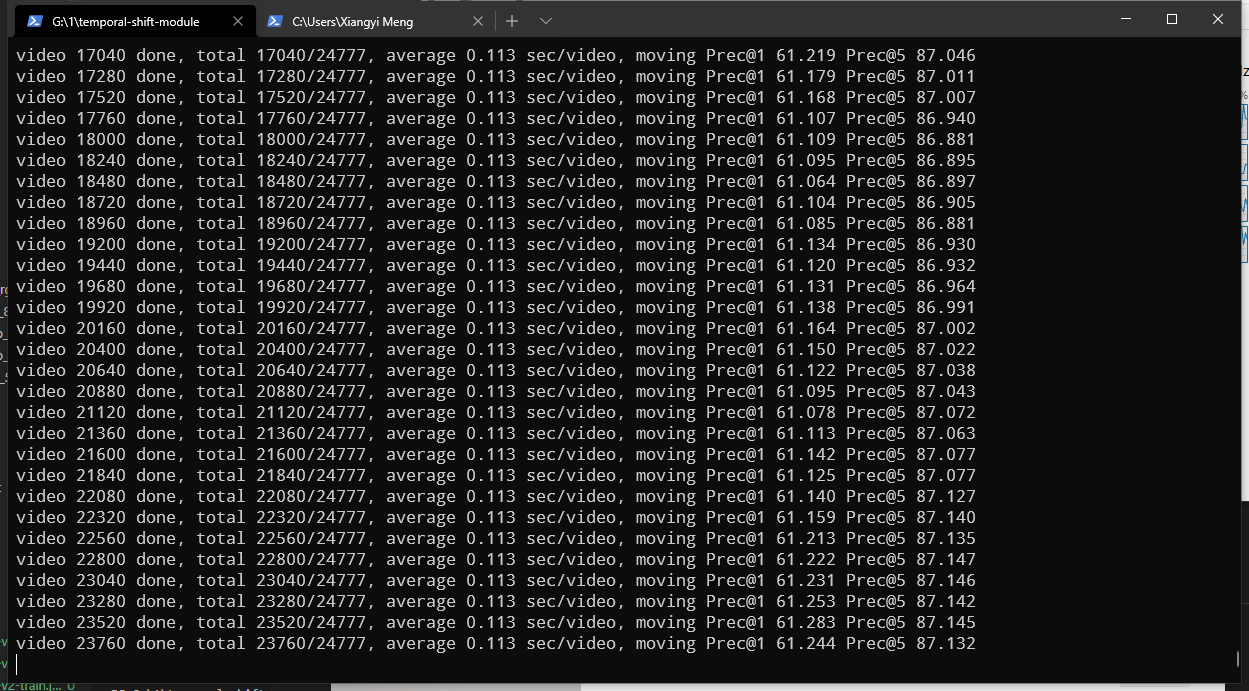
video number:24777
video 0 done, total 0/24777, average 0.879 sec/video, moving Prec@1 65.625 Prec@5 87.500
video 1280 done, total 1280/24777, average 0.239 sec/video, moving Prec@1 60.491 Prec@5 85.640
video 2560 done, total 2560/24777, average 0.230 sec/video, moving Prec@1 60.518 Prec@5 85.671
video 3840 done, total 3840/24777, average 0.227 sec/video, moving Prec@1 60.015 Prec@5 85.374
video 5120 done, total 5120/24777, average 0.225 sec/video, moving Prec@1 60.031 Prec@5 85.475
video 6400 done, total 6400/24777, average 0.226 sec/video, moving Prec@1 59.855 Prec@5 85.334
video 7680 done, total 7680/24777, average 0.224 sec/video, moving Prec@1 59.775 Prec@5 85.292
video 8960 done, total 8960/24777, average 0.223 sec/video, moving Prec@1 59.519 Prec@5 85.284
video 10240 done, total 10240/24777, average 0.224 sec/video, moving Prec@1 59.530 Prec@5 85.423
video 11520 done, total 11520/24777, average 0.224 sec/video, moving Prec@1 59.686 Prec@5 85.497
video 12800 done, total 12800/24777, average 0.224 sec/video, moving Prec@1 59.678 Prec@5 85.487
video 14080 done, total 14080/24777, average 0.225 sec/video, moving Prec@1 59.637 Prec@5 85.464
video 15360 done, total 15360/24777, average 0.225 sec/video, moving Prec@1 59.349 Prec@5 85.315
video 16640 done, total 16640/24777, average 0.225 sec/video, moving Prec@1 59.327 Prec@5 85.327
video 17920 done, total 17920/24777, average 0.226 sec/video, moving Prec@1 59.058 Prec@5 85.204
video 19200 done, total 19200/24777, average 0.226 sec/video, moving Prec@1 59.121 Prec@5 85.206
video 20480 done, total 20480/24777, average 0.226 sec/video, moving Prec@1 59.200 Prec@5 85.295
video 21760 done, total 21760/24777, average 0.227 sec/video, moving Prec@1 59.283 Prec@5 85.337
video 23040 done, total 23040/24777, average 0.227 sec/video, moving Prec@1 59.254 Prec@5 85.422
video 24320 done, total 24320/24777, average 0.227 sec/video, moving Prec@1 59.277 Prec@5 85.421
[0.84482759 0.38815789 0.51633987 0.58252427 0.58974359 0.54385965
0.76738609 0.63636364 0.67716535 0.60264901 0.53932584 0.68613139
0.26923077 0.425 0.7122807 0.51914894 0.42639594 0.38157895
0.46025105 0.57345972 0.51574803 0.62280702 0.55232558 0.56382979
0.56818182 0.52631579 0.6 0.48514851 0.71818182 0.77394636
0.78378378 0.77477477 0.82954545 0.11650485 0.36144578 0.203125
0.84331797 0.82129278 0.22222222 0.79411765 0.71584699 0.73214286
0.59624413 0.62057878 0.72972973 0.51253482 0.5873494 0.40703518
0.42857143 0.80430108 0.7257384 0.06666667 0.40625 0.68571429
0.25 0.42 0.4109589 0.60377358 0.17647059 0.81654676
0.92 0.21568627 0.73417722 0.30841121 0.21621622 0.53301887
0.30188679 0.40298507 0.6754386 0.43 0.64285714 0.47826087
0.54411765 0.61538462 0.66981132 0.36842105 0.5 0.30769231
0.2962963 0.77586207 0.296875 0.168 0.36170213 0.44680851
0.64 0.44444444 0.85882353 0.792 0.25 0.19277108
0.56521739 0.85 0.57894737 0.764 0.76694915 0.13888889
0.14705882 0.2892562 0.51020408 0.67765568 0.46792453 0.62637363
0.29310345 0.8125 0.7480315 0.73333333 0.52054795 0.66502463
0.39189189 0.48 0.6056338 0.05555556 0.49640288 0.27777778
0.69097222 0.54347826 0.25925926 0.77777778 0.40677966 0.64356436
0.80314961 0.80681818 0.34975369 0.69230769 0.36538462 0.63761468
0.55339806 0.42608696 0.1302682 0.70955882 0.32142857 0.35616438
0.44827586 0.24561404 0.79619565 0.62269939 0.23529412 0.45
0.24770642 0.72727273 0.6627907 0.359375 0.59375 0.63311688
0.56050955 0.44680851 0.74166667 0.0859375 0.55230126 0.90754717
0.76902174 0.33152174 0.3877551 0.75229358 0.51181102 0.29268293
0.5 0.58695652 0.55045872 0.34545455 0.41284404 0.46052632
0.43925234 0.45 0.84398977 0.88709677 0.96428571 0.94444444
0.81666667 0.70666667 0.45098039 0.72115385 0.74418605 0.65693431]
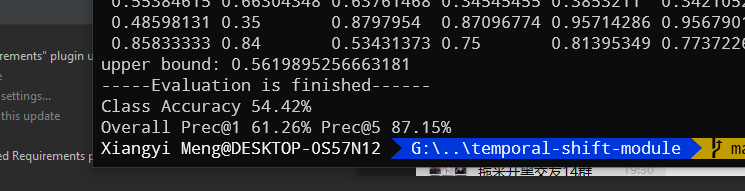
upper bound: 0.548518228331384
-----Evaluation is finished------
Class Accuracy 53.84%
Overall Prec@1 59.26% Prec@5 85.45%
/home/xiangyi/miniconda3/envs/pan/lib/python3.7/site-packages/numpy/core/_asarray.py:136: VisibleDeprecationWarning: Creating an ndarray from ragged nested sequences (which is a list-or-tuple of lists-or-tuples-or ndarrays with different lengths or shapes) is deprecated. If you meant to do this, you must specify 'dtype=object' when creating the ndarray
return array(a, dtype, copy=False, order=order, subok=True)
1
2
3
4
5
6
7
8
9
10
11
12
13
14
15
16
17
18
19
20
21
22
23
24
25
26
27
28
29
30
31
32
33
34
35
36
37
38
39
40
41
42
43
44
45
46
47
48
49
50
51
52
53
54
55
56
57
58
59
60
61
62
63
64
65
66
67
68
69
70
71
72
73
74
75
76
77
78
79
80
81
82
83
84
85
86
87
88
89
90
91
92
93
94
95
96
97
98
99
100
101
102
103
104
105
106
107
108
109
110
111
112
113
114
115
116
117
118
119
120
121
122
$ python test_models.py somethingv2 --VAP --batch_size=16 -j=4 --test_crops=1 --test_segments=8 --weights=pretrained/PAN_Lite_somethingv2_resnet50_shift8_blockres_avg_segment8_e80.pth.tar
somethingv2: 174 classes
=> shift: True, shift_div: 8, shift_place: blockres
=> base model: resnet50
=> Adding temporal shift...
=> Using 3-level VAP
=> Converting the ImageNet model to a PAN_Lite init model
=> Done. PAN_lite model ready...
video number:24777
video 0 done, total 0/24777, average 4.263 sec/video, moving Prec@1 56.250 Prec@5 81.250
video 320 done, total 320/24777, average 0.481 sec/video, moving Prec@1 65.476 Prec@5 86.310
video 640 done, total 640/24777, average 0.399 sec/video, moving Prec@1 60.976 Prec@5 85.213
video 960 done, total 960/24777, average 0.452 sec/video, moving Prec@1 60.246 Prec@5 85.348
video 1280 done, total 1280/24777, average 0.424 sec/video, moving Prec@1 60.880 Prec@5 85.802
video 1600 done, total 1600/24777, average 0.400 sec/video, moving Prec@1 60.458 Prec@5 85.334
video 1920 done, total 1920/24777, average 0.397 sec/video, moving Prec@1 60.227 Prec@5 85.537
video 2240 done, total 2240/24777, average 0.398 sec/video, moving Prec@1 60.151 Prec@5 85.594
video 2560 done, total 2560/24777, average 0.390 sec/video, moving Prec@1 60.404 Prec@5 85.637
video 2880 done, total 2880/24777, average 0.388 sec/video, moving Prec@1 60.290 Prec@5 85.463
video 3200 done, total 3200/24777, average 0.386 sec/video, moving Prec@1 60.261 Prec@5 85.572
video 3520 done, total 3520/24777, average 0.380 sec/video, moving Prec@1 60.436 Prec@5 85.605
video 3840 done, total 3840/24777, average 0.372 sec/video, moving Prec@1 60.062 Prec@5 85.425
video 4160 done, total 4160/24777, average 0.368 sec/video, moving Prec@1 59.962 Prec@5 85.321
video 4480 done, total 4480/24777, average 0.367 sec/video, moving Prec@1 59.831 Prec@5 85.343
video 4800 done, total 4800/24777, average 0.365 sec/video, moving Prec@1 59.884 Prec@5 85.507
video 5120 done, total 5120/24777, average 0.362 sec/video, moving Prec@1 60.008 Prec@5 85.533
video 5440 done, total 5440/24777, average 0.358 sec/video, moving Prec@1 60.392 Prec@5 85.521
video 5760 done, total 5760/24777, average 0.355 sec/video, moving Prec@1 60.336 Prec@5 85.457
video 6080 done, total 6080/24777, average 0.352 sec/video, moving Prec@1 60.285 Prec@5 85.400
video 6400 done, total 6400/24777, average 0.351 sec/video, moving Prec@1 59.804 Prec@5 85.318
video 6720 done, total 6720/24777, average 0.348 sec/video, moving Prec@1 59.650 Prec@5 85.125
video 7040 done, total 7040/24777, average 0.347 sec/video, moving Prec@1 59.736 Prec@5 85.204
video 7360 done, total 7360/24777, average 0.344 sec/video, moving Prec@1 59.585 Prec@5 85.182
video 7680 done, total 7680/24777, average 0.342 sec/video, moving Prec@1 59.771 Prec@5 85.265
video 8000 done, total 8000/24777, average 0.341 sec/video, moving Prec@1 59.681 Prec@5 85.292
video 8320 done, total 8320/24777, average 0.339 sec/video, moving Prec@1 59.633 Prec@5 85.281
video 8640 done, total 8640/24777, average 0.337 sec/video, moving Prec@1 59.635 Prec@5 85.386
video 8960 done, total 8960/24777, average 0.336 sec/video, moving Prec@1 59.548 Prec@5 85.316
video 9280 done, total 9280/24777, average 0.334 sec/video, moving Prec@1 59.477 Prec@5 85.273
video 9600 done, total 9600/24777, average 0.333 sec/video, moving Prec@1 59.536 Prec@5 85.358
video 9920 done, total 9920/24777, average 0.331 sec/video, moving Prec@1 59.652 Prec@5 85.397
video 10240 done, total 10240/24777, average 0.331 sec/video, moving Prec@1 59.565 Prec@5 85.413
video 10560 done, total 10560/24777, average 0.330 sec/video, moving Prec@1 59.503 Prec@5 85.354
video 10880 done, total 10880/24777, average 0.329 sec/video, moving Prec@1 59.554 Prec@5 85.380
video 11200 done, total 11200/24777, average 0.330 sec/video, moving Prec@1 59.576 Prec@5 85.396
video 11520 done, total 11520/24777, average 0.329 sec/video, moving Prec@1 59.639 Prec@5 85.480
video 11840 done, total 11840/24777, average 0.327 sec/video, moving Prec@1 59.691 Prec@5 85.417
video 12160 done, total 12160/24777, average 0.326 sec/video, moving Prec@1 59.675 Prec@5 85.422
video 12480 done, total 12480/24777, average 0.325 sec/video, moving Prec@1 59.675 Prec@5 85.451
video 12800 done, total 12800/24777, average 0.325 sec/video, moving Prec@1 59.691 Prec@5 85.471
video 13120 done, total 13120/24777, average 0.324 sec/video, moving Prec@1 59.645 Prec@5 85.490
video 13440 done, total 13440/24777, average 0.323 sec/video, moving Prec@1 59.617 Prec@5 85.486
video 13760 done, total 13760/24777, average 0.322 sec/video, moving Prec@1 59.640 Prec@5 85.475
video 14080 done, total 14080/24777, average 0.321 sec/video, moving Prec@1 59.641 Prec@5 85.464
video 14400 done, total 14400/24777, average 0.322 sec/video, moving Prec@1 59.600 Prec@5 85.502
video 14720 done, total 14720/24777, average 0.323 sec/video, moving Prec@1 59.521 Prec@5 85.437
video 15040 done, total 15040/24777, average 0.323 sec/video, moving Prec@1 59.358 Prec@5 85.355
video 15360 done, total 15360/24777, average 0.323 sec/video, moving Prec@1 59.365 Prec@5 85.341
video 15680 done, total 15680/24777, average 0.322 sec/video, moving Prec@1 59.353 Prec@5 85.302
video 16000 done, total 16000/24777, average 0.321 sec/video, moving Prec@1 59.328 Prec@5 85.340
video 16320 done, total 16320/24777, average 0.322 sec/video, moving Prec@1 59.341 Prec@5 85.327
video 16640 done, total 16640/24777, average 0.320 sec/video, moving Prec@1 59.312 Prec@5 85.315
video 16960 done, total 16960/24777, average 0.320 sec/video, moving Prec@1 59.295 Prec@5 85.315
video 17280 done, total 17280/24777, average 0.320 sec/video, moving Prec@1 59.256 Prec@5 85.291
video 17600 done, total 17600/24777, average 0.321 sec/video, moving Prec@1 59.191 Prec@5 85.280
video 17920 done, total 17920/24777, average 0.321 sec/video, moving Prec@1 59.066 Prec@5 85.220
video 18240 done, total 18240/24777, average 0.321 sec/video, moving Prec@1 59.109 Prec@5 85.232
video 18560 done, total 18560/24777, average 0.321 sec/video, moving Prec@1 59.189 Prec@5 85.255
video 18880 done, total 18880/24777, average 0.320 sec/video, moving Prec@1 59.113 Prec@5 85.198
video 19200 done, total 19200/24777, average 0.319 sec/video, moving Prec@1 59.128 Prec@5 85.205
video 19520 done, total 19520/24777, average 0.319 sec/video, moving Prec@1 59.142 Prec@5 85.227
video 19840 done, total 19840/24777, average 0.319 sec/video, moving Prec@1 59.136 Prec@5 85.244
video 20160 done, total 20160/24777, average 0.320 sec/video, moving Prec@1 59.199 Prec@5 85.255
video 20480 done, total 20480/24777, average 0.320 sec/video, moving Prec@1 59.202 Prec@5 85.290
video 20800 done, total 20800/24777, average 0.319 sec/video, moving Prec@1 59.204 Prec@5 85.295
video 21120 done, total 21120/24777, average 0.319 sec/video, moving Prec@1 59.226 Prec@5 85.328
video 21440 done, total 21440/24777, average 0.318 sec/video, moving Prec@1 59.270 Prec@5 85.314
video 21760 done, total 21760/24777, average 0.318 sec/video, moving Prec@1 59.285 Prec@5 85.342
video 22080 done, total 22080/24777, average 0.318 sec/video, moving Prec@1 59.314 Prec@5 85.355
video 22400 done, total 22400/24777, average 0.318 sec/video, moving Prec@1 59.284 Prec@5 85.377
video 22720 done, total 22720/24777, average 0.318 sec/video, moving Prec@1 59.236 Prec@5 85.340
video 23040 done, total 23040/24777, average 0.317 sec/video, moving Prec@1 59.256 Prec@5 85.414
video 23360 done, total 23360/24777, average 0.317 sec/video, moving Prec@1 59.274 Prec@5 85.417
video 23680 done, total 23680/24777, average 0.317 sec/video, moving Prec@1 59.246 Prec@5 85.403
video 24000 done, total 24000/24777, average 0.318 sec/video, moving Prec@1 59.231 Prec@5 85.389
video 24320 done, total 24320/24777, average 0.317 sec/video, moving Prec@1 59.291 Prec@5 85.413
video 24640 done, total 24640/24777, average 0.317 sec/video, moving Prec@1 59.259 Prec@5 85.436
[0.84482759 0.38815789 0.51633987 0.58252427 0.58974359 0.54385965
0.76738609 0.63636364 0.67716535 0.60264901 0.53932584 0.68613139
0.26923077 0.425 0.7122807 0.51914894 0.42639594 0.38157895
0.46025105 0.57345972 0.51574803 0.62280702 0.55232558 0.56382979
0.56818182 0.52631579 0.6 0.48514851 0.71818182 0.77394636
0.78378378 0.77477477 0.82954545 0.11650485 0.36144578 0.203125
0.84331797 0.82129278 0.22222222 0.79411765 0.71584699 0.73214286
0.59624413 0.62057878 0.72972973 0.51253482 0.5873494 0.40703518
0.42857143 0.80430108 0.7257384 0.06666667 0.40625 0.68571429
0.25 0.42 0.4109589 0.60377358 0.17647059 0.81654676
0.92 0.21568627 0.73417722 0.30841121 0.21621622 0.53301887
0.30188679 0.40298507 0.6754386 0.43 0.64285714 0.47826087
0.54411765 0.61538462 0.66981132 0.36842105 0.5 0.30769231
0.2962963 0.77586207 0.296875 0.168 0.36170213 0.44680851
0.64 0.44444444 0.85882353 0.792 0.25 0.19277108
0.56521739 0.85 0.57894737 0.764 0.76694915 0.13888889
0.14705882 0.2892562 0.51020408 0.67765568 0.46792453 0.62637363
0.29310345 0.8125 0.7480315 0.73333333 0.52054795 0.66502463
0.39189189 0.48 0.6056338 0.05555556 0.49640288 0.27777778
0.69097222 0.54347826 0.25925926 0.77777778 0.40677966 0.64356436
0.80314961 0.80681818 0.34975369 0.69230769 0.36538462 0.63761468
0.55339806 0.42608696 0.1302682 0.70955882 0.32142857 0.35616438
0.44827586 0.24561404 0.79619565 0.62269939 0.23529412 0.45
0.24770642 0.72727273 0.6627907 0.359375 0.59375 0.63311688
0.56050955 0.44680851 0.74166667 0.0859375 0.55230126 0.90754717
0.76902174 0.33152174 0.3877551 0.75229358 0.51181102 0.29268293
0.5 0.58695652 0.55045872 0.34545455 0.41284404 0.46052632
0.43925234 0.45 0.84398977 0.88709677 0.96428571 0.94444444
0.81666667 0.70666667 0.45098039 0.72115385 0.74418605 0.65693431]
upper bound: 0.548518228331384
-----Evaluation is finished------
Class Accuracy 53.84%
Overall Prec@1 59.26% Prec@5 85.45%
E:\Program Files\Anaconda3\envs\tsm\lib\site-packages\numpy\core\_asarray.py:136: VisibleDeprecationWarning: Creating an ndarray from ragged nested sequences (which is a list-or-tuple of lists-or-tuples-or ndarrays with different lengths or shapes) is deprecated. If you meant to do this, you must specify 'dtype=object' when creating the ndarray
return array(a, dtype, copy=False, order=order, subok=True)

#相关链接

TSM Temporal Shift Module for Efficient Video Understanding

#TSM: Temporal Shift Module for Efficient Video Understanding

核心思想

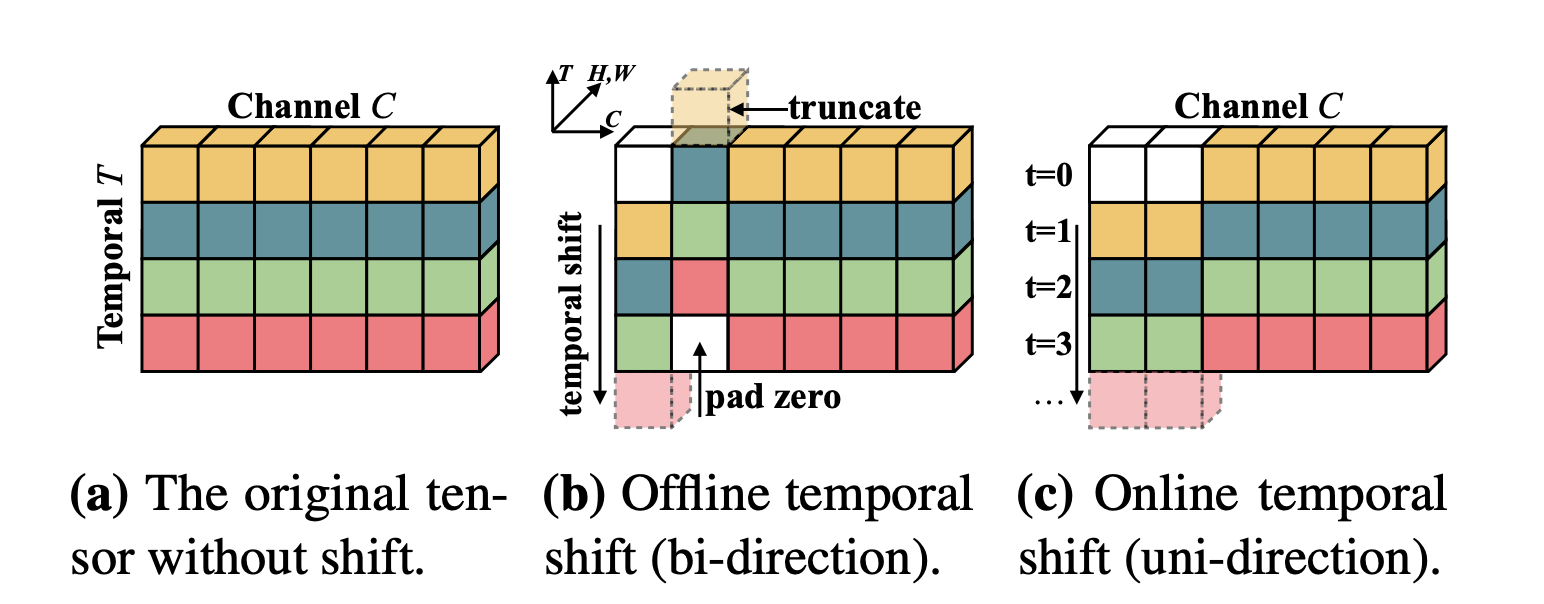
文章实现了在 2D 模型上达到 3D 模型的精度,极大的降低了计算。其核心思想是通过一种shift操作,将时间纬度上的不同帧之间的通道进行偏移,以达到共享时间特征的目的。

然而并不是所有的shift操作都可以达到效果的,虽然shift操作不需要额外的运算但是仍然需要数据的移动,太多的移动会带来延迟。

除此之外,shift是增加时间特征的提取,太多的shift操作也会导致空间特征的提取受到影响。

作者思路

故文章中所提出的是一种改进的shift策略:并不是shift所有的channels,而是只选择性的shift其中的一部分,该策略能够有效的减少数据移动所带来的时间复杂度。

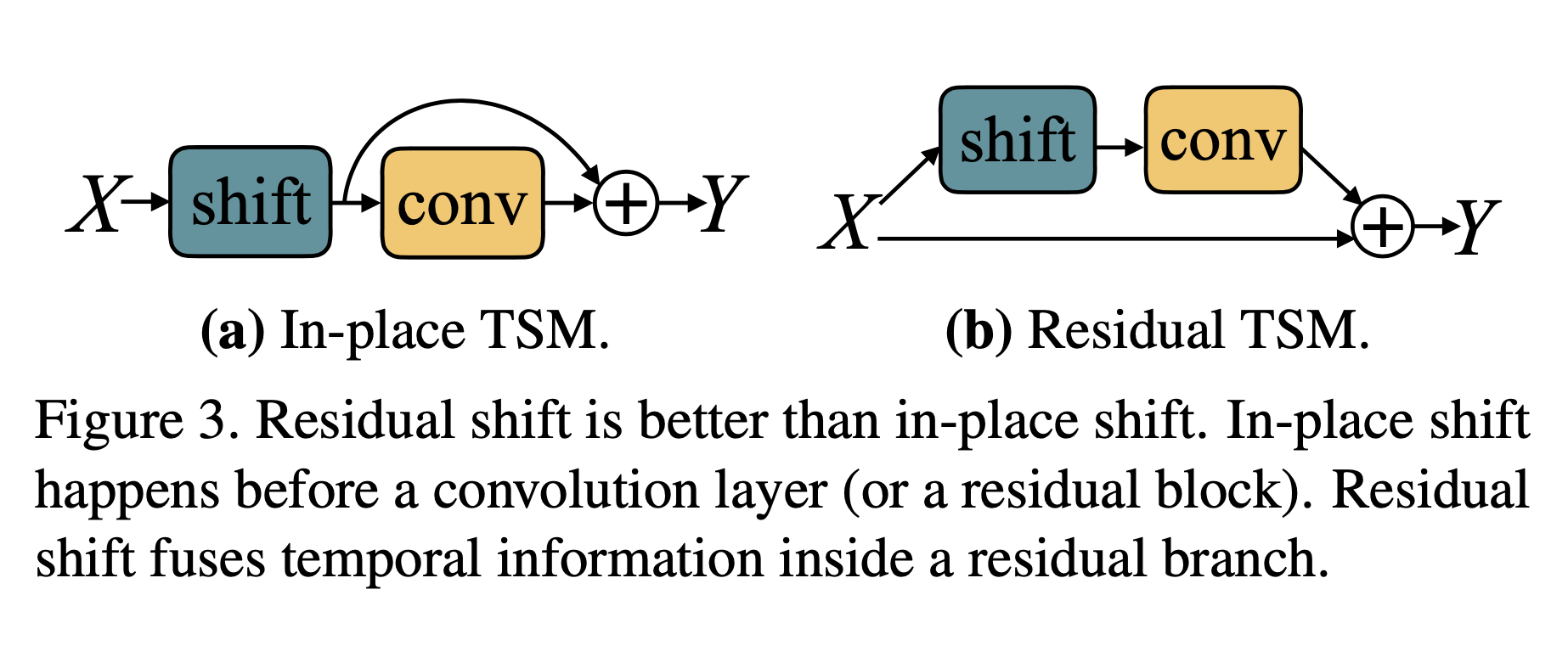
另外TSM并不是直接被插入到从前往后的干道中的,而是以旁路的形式进行,因此在获得了时序信息的同时不会对二维卷积的空间信息进行损害。

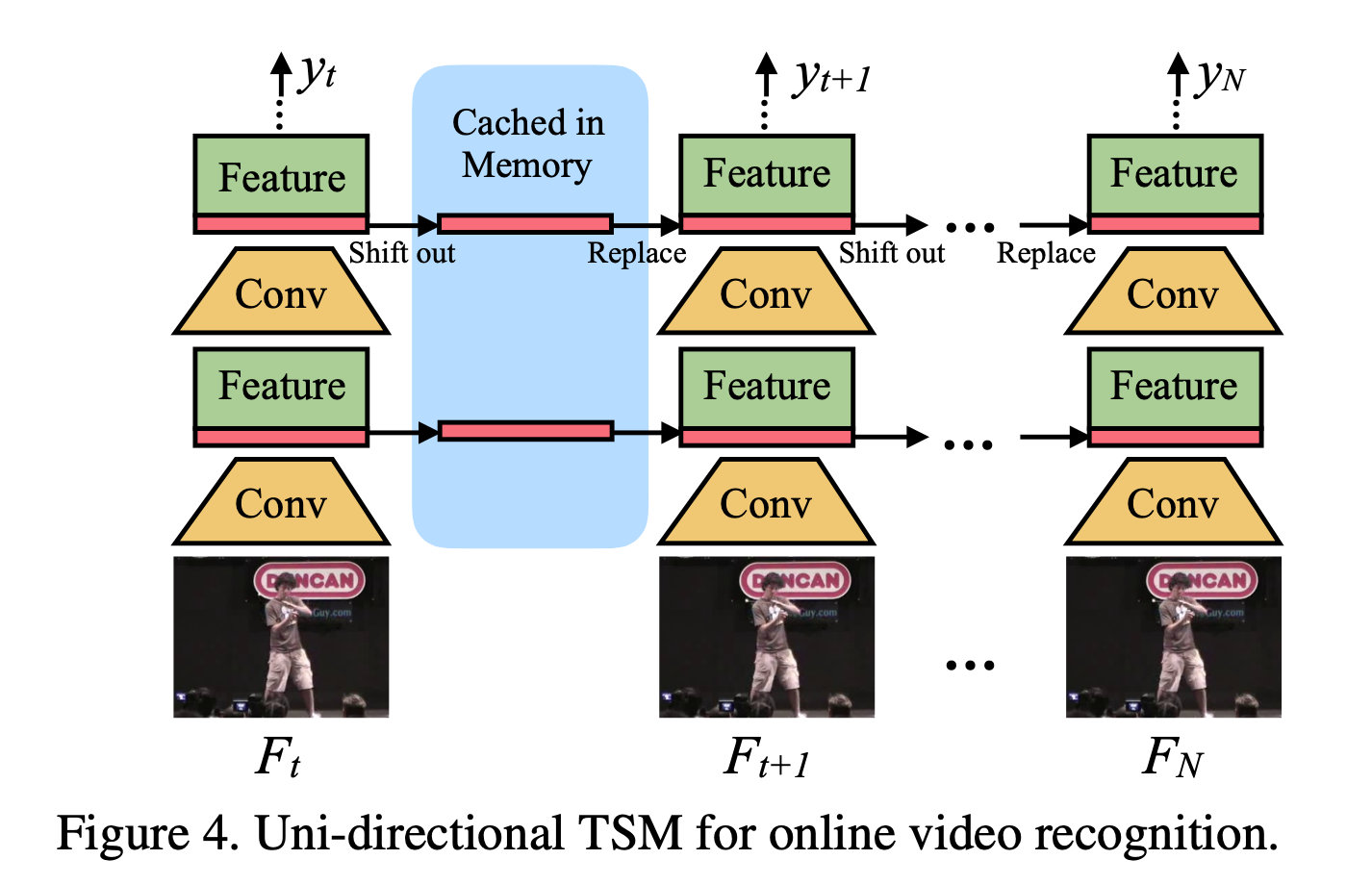
同时作者对于一些实时的在线检测提出了相应的模型策略,不同于将第一层下移第二层上移这种:

在线模型

可以有相应的借鉴思路,并且这篇也是上一篇的基准之一。

#实验结果

过程

结果

#相关链接

Gate-Shift Networks for Video Action Recognition

#Gate-Shift Networks for Video Action Recognition

用于行为识别的Gate-Shift网络

在实践中,由于涉及大量的参数和计算,在缺乏足够大的数据集进行大规模训练的情况下,C3D可能表现不佳。

GSM

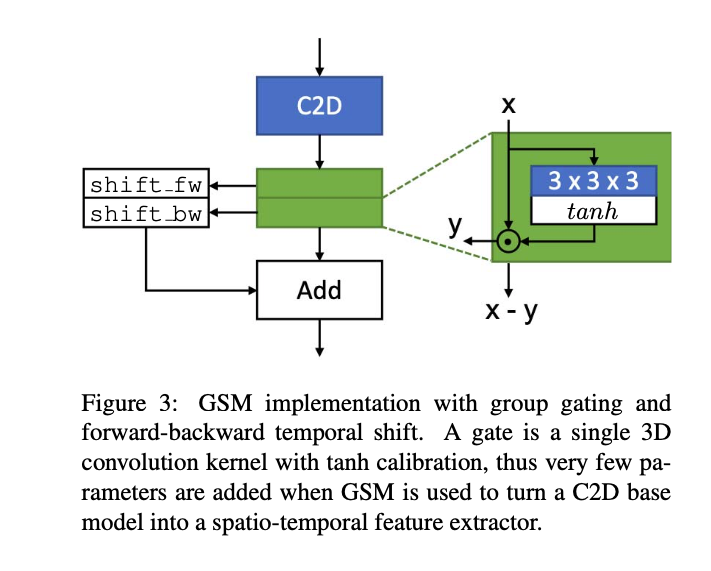
文章提出了一种Gate-Shift Module(GSM),将2D-CNN转换为高效的时空特征抽取器。

通过GSM插件,一个2D-CNN可以适应性地学习时间路由特性并将它们结合起来,并且几乎没有额外的附加参数和计算开销。

思路对比

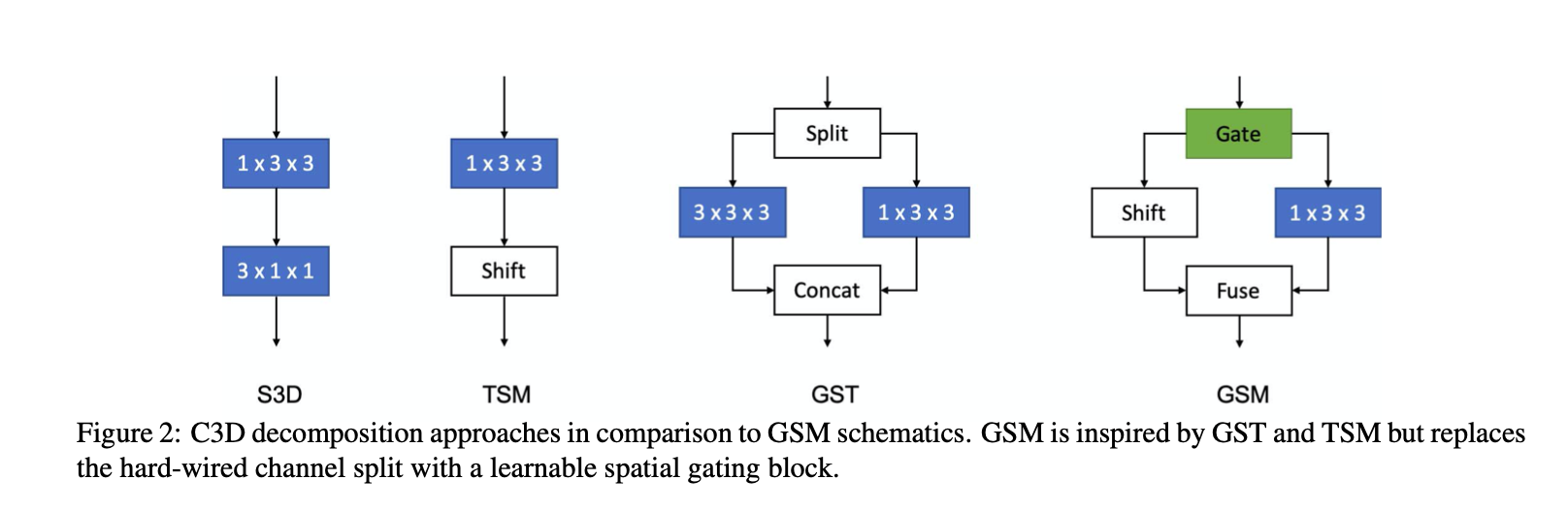
传统的方法演变:C3D -> 2D spatial + 1D temporal -> CSN -> GST(与分离信道组上的二维和三维卷积并行空间和时空交互建模) -> TSM(时域卷积可以被限制为硬编码的时移,使一些信道在时间上向前或向后移动)

所有这些现有的方法都学习具有硬连线连接和跨网络传播模式的结构化内核。
在网络中的任何一点上都没有数据依赖的决策来选择地通过不同的分支来路由特性,分组和随机的模式是在设计之初就固定的,并且学习如何随机是具有组合复杂性的。

实验

From the experiments we conclude that adding GSM to the branch with the least number of convolution layers performs the best.

GSM通过一种门移模块,来让网络自己学习TSM中的shift操作,并通过实验证明在卷积层最少的分支上添加GSM模块表现最好。